Most Human-Machine Interface (HMI) requirements can technically be met by a microcontroller (MCU), a graphics controller (GPU – shorthand we use here for a dedicated display controller, not a standard industry term), or a microprocessor (MPU) running Linux. That’s the part most comparisons skip. The real question isn’t “which architecture can do this” – it’s which one lets you hit your performance target at the lowest total cost and the lowest risk of a redesign six months in. Get this decision wrong, and you don’t find out during development. You find out during validation, when changing course means rebuilding hardware and repeating certification.
Quick answer
Check these three signals before choosing:
- how deterministic/real-time your interface needs to be,
- whether you’re extending an existing MCU-based product,
- and whether networking or advanced UI frameworks are already required.
If none of these push you toward GPU or MPU, MCU is usually the more efficient starting point. Details and exceptions below.
MCU, GPU, and MPU – quick comparison
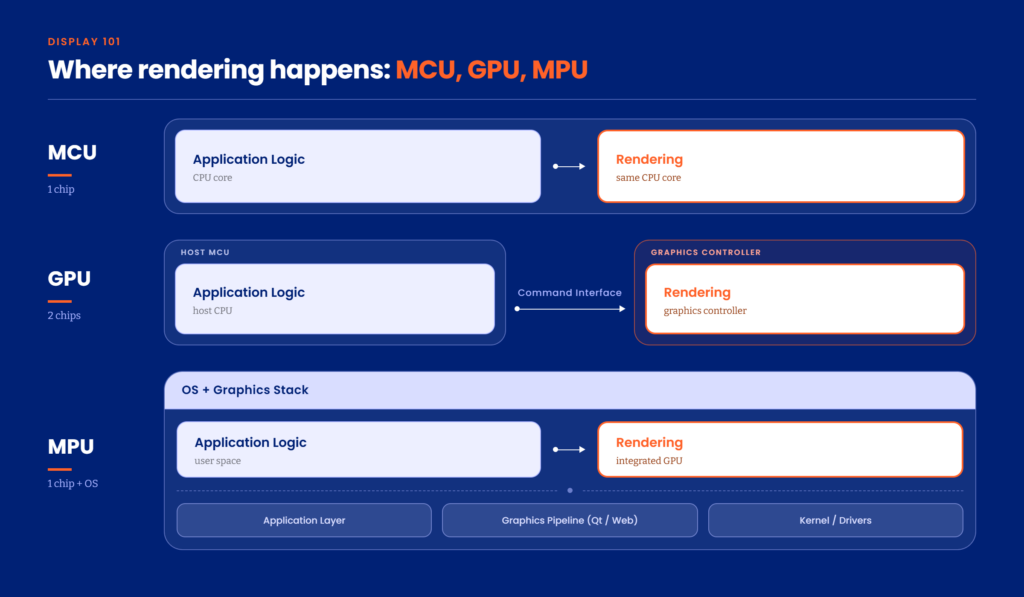
The single difference that defines everything else in this article is which component renders the pixels, and how much of the system you must manage yourself to make that happen. The split below reflects how we group Riverdi’s own product line – not a universal engineering law; other vendors may draw the lines differently.
MCU – the microcontroller renders every pixel (frame buffer)
A Microcontroller Unit (MCU) handles application logic, communication, and UI rendering on one chip. This typically means a frame buffer approach: the MCU calculates and writes every single pixel on the screen. As UI complexity grows – more elements, animations, higher resolution – the load on the MCU grows with it, and this isn’t something you can fully fix later through optimization. It’s a structural limit of the architecture, not a bug in your implementation.
Typical platform: STM32 (see the Riverdi solutions section for specific families).
GPU – the MCU sends commands, a controller renders
A quick clarification: “GPU” here isn’t a standalone graphics processing unit like in a desktop PC. It always depends on an MCU or MPU behind it – it’s not a third, self-sufficient option you can pick instead of them. Think of it as an improved MCU workflow, not a separate category.
In a GPU-based architecture, the MCU no longer touches pixels. Instead, it sends high-level commands – “draw a button,” “display an image” – and a dedicated display controller (in Riverdi’s case, BridgeTek’s EVE family) handles the actual rendering. This offloads most of the graphics workload from the MCU, which is why GPU-based systems are often described as an “improved MCU” rather than a separate category: you keep your existing application logic and hardware philosophy, you just stop asking the MCU to draw.
Typical platform: BridgeTek EVE (see the Riverdi solutions section for specific generations).
MPU – a full operating system (Linux) and graphics stack (Qt, web)
A Microprocessor Unit (MPU) runs a full operating system, usually Linux, with rendering handled by a complete graphics pipeline – Qt, web-based frameworks, or others. The useful mental model here isn’t “a more powerful MCU.” It’s a small computer. You’re not managing pixels or even drawing commands anymore; you’re managing an operating system, driver stack, and application layer, all of which need configuration before you write a single line of UI code.
Typical platform: Linux-capable SoM/SBC (see the Riverdi solutions section for specific vendors).
Why this decision is made before you pick a display
What architecture defines once, and permanently
Choosing an architecture isn’t a technical preference – it’s the constraint that everything else in the project operates inside of. It sets up your performance ceiling: an MCU-based system already limits your UI complexity, resolution, and animation capability before you’ve written a line of code, and that ceiling doesn’t move with clever optimization later. It also sets your development timeline and system complexity – and it has a cost, mostly in engineering time rather than hardware.
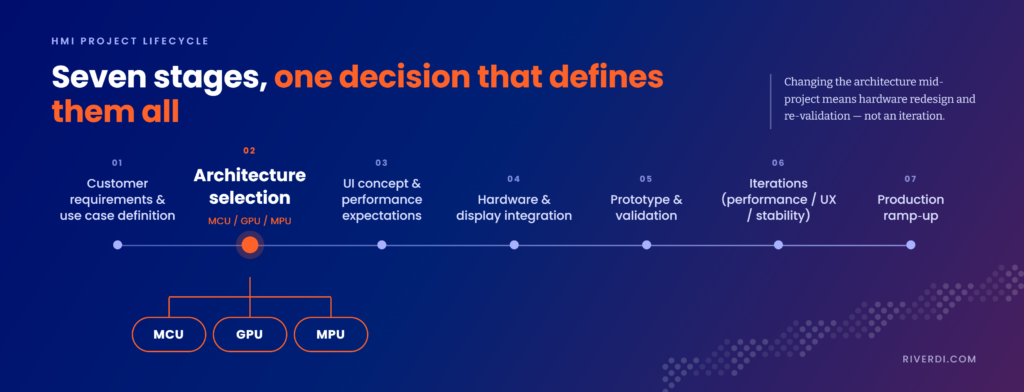
Why a mid-project switch means hardware redesign and re-validation
The hardware and software validation cycle for an HMI typically runs:
requirements → architecture selection → UI concept → hardware and display integration → prototyping and validation → iteration → production
Problems rarely surface at the beginning. They surface during validation – performance isn’t sufficient, image quality doesn’t meet expectations, or resolution needs turn out higher than planned. If the architecture was chosen correctly, this is an iteration. If it wasn’t, this is a redesign: switching architecture mid-project usually means rewriting software, redesigning hardware, and repeating validation from scratch. That’s usually the most expensive failure mode in the lifecycle. It’s also one of the most avoidable, because it’s decided in week one.
The practical implication: choose the architecture for what the product needs in the next six to twelve months, not for what it needs today.
MCU vs GPU vs MPU – comparing performance, complexity, cost, and use cases
The table below summarizes tendencies, not verdicts. A well-specified MCU project can outperform a poorly specified GPU one on cost; a GPU system with the wrong requirements can quietly become an MPU project in disguise. Use this as a starting map, then check it against the decision framework in the next section.
| Factor | MCU | GPU | MPU |
| Rendering | Frame buffer, rendered on the MCU | MCU sends high-level commands; controller renders | Full graphics pipeline via OS (Qt, web frameworks) |
| Performance | Limited; drops as UI complexity grows | Optimized for typical HMI/UI tasks | Highest – supports video and advanced multi-layer UI |
| Complexity | Simple hardware, software complexity rises near the performance limit | Simple hardware, moderate software complexity | System-level complexity – full Linux stack to configure and maintain |
| Cost (hardware)* | Lowest | Medium | Highest |
| Redesign risk | High – hardware is tailored to the application, often requiring full redesign if requirements shift | Lower – modular, allows partial redesign | Lower – modular, allows partial redesign |
| Development time | Fast for simple UIs, slows sharply near the performance ceiling | Consistent, fast – but requires learning the command pipeline | Slow initial setup (system bring-up), scales quickly afterward |
| Best use case | Real-time, deterministic, sensor-heavy systems | Adding a modern UI to an existing MCU-based system | Complex, connected systems with advanced UI and networking |
Note on cost: hardware is the easiest line item to compare architectures, but it typically isn’t what determines total project cost. Engineering time and the cost of getting the architecture wrong (redesign risk) are harder to predict – and, in practice, more often decide the outcome.
When each architecture shines
- MCU is usually the natural choice for real-time control and sensor-driven applications where deterministic behavior, fast boot, and tight hardware control matter more than UI richness – common in industrial and medical equipment.
- GPU-based systems are strongest when you already have a working MCU-based system and need to add a modern interface without redesigning what already works. You keep your existing firmware and logic architecture and connect a display controller – over SPI, for example – without adding meaningful system complexity. One MCU can also drive multiple GPU-based displays, which is relevant if you’re standardizing an interface across several sub-panels.
- MPU is typically the only architecture that structurally supports networking, complex data processing, or advanced UI frameworks like Qt or web technologies. At that point, MCU and GPU workarounds tend to add cost and complexity rather than remove the need for MPU, and the remaining decision is which MPU platform gets you there most efficiently.
Where each architecture breaks
- MCU breaks down as soon as UI complexity exceeds what the frame buffer approach can handle efficiently – advanced graphics, animations, or higher resolution push performance down and make the system harder to maintain. Memory limitations tend to surface early.
- GPU-based systems are efficient for UI but aren’t designed to carry system-level responsibilities. Treating a GPU-plus-MCU combination as a substitute for an MPU – expecting it to handle advanced processing, connectivity, or general-purpose flexibility – is a common and costly miscalculation.
- MPU rarely fails on performance. It fails on complexity: full Linux configuration, driver stack, and long-term maintenance require meaningfully more expertise than MCU or GPU-based designs, and initial system bring-up takes noticeably longer.
How to choose – a simple decision framework
The question to ask isn’t “which architecture do I prefer” — it’s “what do my actual requirements already imply.” For MPU specifically, this matters most: the decision isn’t “do I want an MPU”, it’s: “do my requirements already define that I need one”. If they do – networking, multi-application logic, OTA updates, or a framework like Qt or web stack – then MPU generally becomes the only architecture that can structurally carry them. MCU and GPU can be pushed toward that gap, but usually at a cost and complexity that outweighs the benefit of avoiding MPU. At that point the real decision becomes which MPU platform, module, and level of integration gets you there at the lowest cost and risk.
Where MCU carries the interface on its own
Typical signals: fast boot is required, behavior needs to be deterministic, you’re driving sensors directly, and reliability matters more than visual complexity. In these cases, MCU isn’t just adequate – it’s usually the most efficient choice on both cost and development time.
Adding a modern UI without a redesign
Typical signals: you have a working system you don’t want to redesign, you want to keep the existing MCU and firmware logic untouched, and you need a display added with minimal integration effort – often over a single interface line (e.g., SPI). This is also the right path when you want to drive several displays from one MCU.
Let MPU be dictated by requirements, not preference
Typical signals: your system needs networking, multi-application logic, over-the-air updates, or a UI framework like Qt or a web stack – in other words, the display is one part of a larger connected system rather than the whole point. If these requirements are already on your list, MPU isn’t a “bigger” option to consider – it’s generally the architecture that structurally supports them, with MCU or GPU workarounds adding more cost and complexity than they save.
Riverdi solutions for each architecture
Riverdi doesn’t build around one architecture – the platform lineup mirrors the three approaches above, so the recommendation depends on what the project needs.
MCU – STM32 (U5, H7); ESP32, Renesas, STM32N6, and NXP support in progress
Riverdi’s MCU-based embedded displays use STM32U5 for smaller display sizes and STM32H7 for larger ones – both integrated platforms designed for real-time, control-focused applications. NXP-based solutions are planned for later this year, extending this line beyond the STM32 family.
GPU – the full BridgeTek EVE line (EVE1–EVE5)
Riverdi supports the complete range of BridgeTek EVE controllers, from EVE1 through the recently released EVE5. These are commonly used both for efficient, purpose-built HMIs and for upgrading existing MCU-based systems with a modern interface without a full redesign.
MPU – Toradex, SoMLabs, Raspberry Pi Compute Modules
For MPU-based designs, Riverdi works with Toradex, SoMLabs, and Raspberry Pi Compute Modules (CM4 and CM5), enabling Linux-based designs with advanced UI and connectivity.
Riverdi also offers bare displays and plug-and-play solutions (HDMI, USB-C) for cases where the architecture decision sits entirely on the customer’s side.
Summary
Architecture choice in an embedded display project isn’t about finding the one “correct” option – it’s about matching the platform to requirements you can already state with confidence, because the cost of getting it wrong grows sharply once validation starts. MCU, GPU, and MPU each solve a different problem well; the framework above is meant to help you identify which problem you have before hardware gets built.
Most of these requirements could technically be forced onto any of the three architectures – the framework is about which path gets you there at the lowest cost and risk, not which one is “required.”
FAQ
Do I need to pick the “perfect” architecture, or just one good enough?
Neither exactly. MCU, GPU, and MPU can each technically meet most requirements on paper – there’s rarely one “correct” answer waiting to be found. The goal is to find the option that hits your performance target at the lowest cost and the lowest redesign risk for what the product needs in the next 6–12 months. Two teams with the same requirements can reasonably land on different architectures if their cost constraints, existing hardware, or risk tolerance differ – and both can be right.
Is MCU enough for an animated interface?
It depends on how much animation and resolution you need. MCU-based frame buffer rendering can handle simple, lightweight UI elements, but performance drops as animation complexity and resolution increase – and this is a structural limit, not something you can optimize later. If animation is a core requirement rather than a nice-to-have, GPU or MPU is usually the more efficient starting point.
Is GPU just an MPU with a lighter system?
No. A GPU-based display controller offloads rendering from the MCU, but it doesn’t run an operating system or manage system-level tasks. It’s closer to an enhanced MCU workflow than a lightweight MPU – it shouldn’t be used as a substitute for MPU-level processing, connectivity, or flexibility.
Can multiple GPU-based displays be driven from a single MCU?
Yes. Because the MCU sends high-level draw commands rather than rendering pixels itself, one MCU can drive several GPU-based displays, which is a practical option when standardizing an interface across multiple panels in the same product.
How early in the project do I actually need to lock in the architecture?
Before UI concept work and hardware integration begin – ideally right after requirements are defined. Architecture decisions set the performance ceiling and system complexity for everything downstream, and this is very difficult to change once integration and validation are underway. Choose based on what the product needs in the next 6–12 months, not just its current scope.
Can I switch from one architecture to another later without a full redesign?
It depends on which direction you’re switching. MCU-based hardware is tightly tailored to the application, so moving away from it usually means a full hardware redesign. GPU and MPU-based systems are more modular and typically allow a partial redesign instead of a full rebuild – but “partial” still means real engineering time, not a configuration change.
Is there an option to prototype without committing to architecture yet?
Yes, to a limited extent. Bare displays and plug-and-play interfaces (HDMI, USB-C) let you validate a UI concept before locking in MCU, GPU, or MPU. This works for early-stage prototyping and concept validation, but it doesn’t remove the need to choose an architecture before integration – it only delays that decision by one project phase.
Does Riverdi push a specific architecture, or help evaluate which one fits?
Riverdi supports all three approaches – STM32-based MCU displays, the full BridgeTek EVE line for GPU, and Linux-capable MPU platforms like Toradex and Raspberry Pi Compute Modules. Which one fits depends on the project’s performance, cost, and complexity requirements.
Still not sure which architecture fits? That’s a normal place to be – the answer usually depends on constraints that only become obvious once you put them side by side. Tell us what the product has to do: performance, connectivity, environment, timeline. We’ll walk you through which of the three fits, and where the trade-offs land. Talk to our engineers.
DISCOVER OUR
Whitepaper
Achieve the perfect user-display interaction with the right Touch Sensor IC. Ever faced issues with phantom touch events or certification? Boost your R&D like a pro with our Whitepaper!
Go to our product catalog and see how you can save by quality, not on quality.