Quick answer and comparison table
Capacitive and resistive are the two main technologies for embedded and industrial equipment. IR and optical imaging are used on large screens. SAW is limited to clean indoor installations.
| Type | Sensitivity and accuracy | Multi-touch | Gloves or stylus | Water and dust | Relative cost | Typical application |
| Capacitive, PCAP | High | Yes | Glove support requires tuning; conductive stylus | Can reject water; sealed glass front | Medium | Industrial HMI, medical equipment, outdoor terminals |
| Resistive | Good point accuracy; pressure required | Usually no | Thick gloves and passive stylus | Works when sealed; top film is exposed to damage | Low | Simple POS, legacy equipment, low-cost terminals |
| Infrared, IR | High on large screens | Yes | Any object blocking the beam grid | Frame contamination can cause false touches | Medium | Large kiosks and interactive displays |
| Optical imaging | High on large screens | Yes | Finger, glove or pen | Cameras and reflective edges must remain clear | Medium to high | Conference and education displays |
| SAW | High | No in standard systems | Finger or soft rubber stylus | Water and dirt interfere with detection | Medium | Clean indoor terminals |
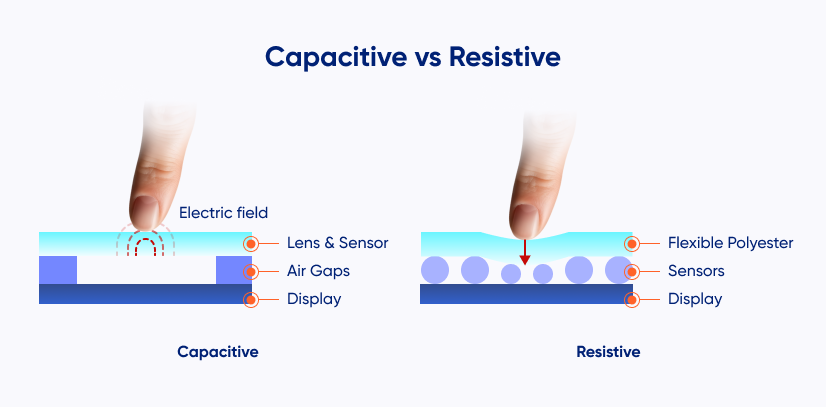
Capacitive vs resistive – the two main technologies
| Criterion | Capacitive touch | Resistive touch |
| Sensitivity | Detects light contact | Requires pressure |
| Multi-touch | Yes | Usually single-touch |
| Gloves | Must be tuned for the specified glove | Works with thick, non-conductive gloves |
| Moisture | Needs water-rejection tuning | Detection remains pressure-based |
| Surface durability | Sensor is protected behind cover glass | Flexible PET layer can be cut or punctured |
| Cost | Higher | Lower |
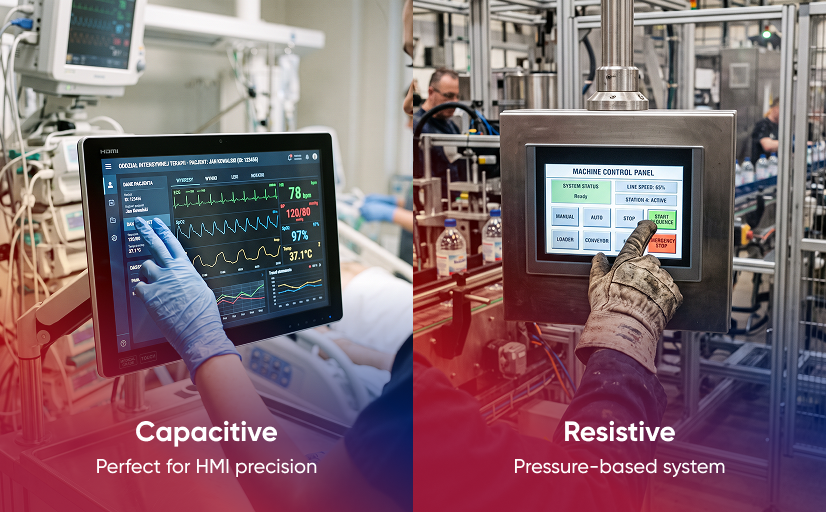
Choose resistive touch only when input must remain independent of glove conductivity. PCAP is the better default for most new HMI designs.
Riverdi touchscreen displays use industrial PCAP as standard. Resistive touch is available as a customized solution for pressure-based input.
Infrared (IR) vs Optical Imaging – large-format touch
| Criterion | Infrared touch | Optical imaging |
| Typical screen size | Large, including 55–100+ inches | Large and very large, including 100+ inches |
| Multi-touch | Yes | Yes |
| Sunlight and temperature | Direct sun can affect receivers; component ratings define the temperature range | Strong ambient light can interfere with camera tracking |
| Construction thickness | Requires an emitter and receiver frame around the display | Cameras increase bezel or corner depth |
| Relative cost | Medium | Medium to high |
IR is used for large kiosks and digital signage. Optical imaging is more common in indoor teaching and conference systems where camera placement is not a mechanical problem.
Surface Acoustic Wave (SAW) – where it fits
SAW provides high optical clarity and uses a hard glass surface. Standard systems are single-touch and need a soft object that absorbs acoustic energy; water or deposits on the glass disturb the signal.
All touch panel types compared
| Criterion | PCAP | Resistive | IR | Optical imaging | SAW |
| Detection principle | Change in capacitance | Contact between conductive layers | Interrupted IR beams | Camera tracking | Acoustic-wave attenuation |
| Activation force | Very low | Pressure required | None | None | Low |
| Standard touch count | Multiple | 1 | Multiple | Multiple | 1 |
| Thick work gloves | After tuning | Yes | Yes | Yes | No |
| Passive hard stylus | No | Yes | Yes | Yes | No |
| Soft rubber stylus | Product-dependent | Yes | Yes | Yes | Yes |
| Water on the surface | Requires rejection tuning | Input can remain usable if sealed | Drops or debris near the frame can block beams | Contamination near the optics can affect tracking | Unreliable |
| Dust, oil or particles | Protected by cover glass | Particles can damage the PET layer when pressed | Insects or debris can trigger false events | Cameras must remain unobstructed | Deposits attenuate the wave |
| Direct sunlight | Touch performance and display readability must be checked separately | Detection still works, but UV and heat age the PET film | IR interference must be controlled | Camera tracking can become unstable | Limited effect on sensing |
| Optical clarity | High | Lower due to the flexible conductive stack | High | High | High |
| Surface protection | Strengthened cover glass | Flexible top film | Separate protective front possible | Separate protective front possible | Hard glass |
| Typical screen size | Small to large | Small to medium | Large to very large | Large to very large | Small to medium |
| Main design risk | Incorrect tuning for the finished assembly | Cuts, point fatigue and UV ageing | Blocked beam path | Lighting and camera alignment | Surface contamination |
| Relative cost | Medium | Low | Medium | Medium to high | Medium |
| Typical use | HMI, medical devices, EV charging | Simple single-touch equipment | Large interactive systems | Indoor collaboration displays | Clean indoor terminals |
Which touch panel is best for your environment?
| Environment or application | Recommended type |
| Indoor building-control panel | Basic PCAP |
| Industrial HMI operated in nitrile gloves | Tuned industrial PCAP |
| Medical or laboratory device | Tuned industrial PCAP |
| EV charger, ticket machine or parking meter | Industrial PCAP with water rejection and AR cover glass |
| Agricultural or construction machine | PCAP behind strengthened glass |
| Simple POS operated with a plastic stylus | Resistive |
| Legacy control panel used in thick gloves | Customized resistive |
| Large indoor kiosk | IR |
| Large outdoor information display | Outdoor-rated IR or large-format PCAP |
| Interactive classroom or conference display | IR or optical imaging |
| Clean indoor museum terminal | SAW or PCAP |
Basic and industrial PCAP use the same sensing principle. The difference is the controller profile and the finished stack. Riverdi modules can be tuned for nitrile or double gloves, water, EMC conditions and cover glass from 1.1 to 15 mm (check the customized solutions page).
The upper end of that glass range is not a default configuration. Signal margin falls as the distance between the finger and sensor increases – accuracy and touch-point count must be verified on the final assembly.
In our experience, PCAP tuning carried out before the cover glass, bonding and enclosure are fixed does not give a reliable production result.
Quick checklist before you choose
- Screen size
- Required input: finger, glove or stylus
- Exposure to water, dust and direct sun
- Required touch-point count
- Budget and expected surface life
FAQ
Is capacitive touch better than resistive?
For most new industrial and medical devices, yes. Resistive remains justified when pressure-based input is required.
Does touch technology matter for outdoor use?
Yes. PCAP needs water rejection and a suitable front stack. Resistive panels suffer from PET ageing under UV. IR systems must handle sunlight and beam obstruction.
Which touch panel works best with gloves?
Resistive accepts the widest range of gloves. Industrial PCAP works with specified gloves after tuning.
What is the most durable touch panel type?
PCAP behind strengthened glass provides a protected surface without exposing the sensing layer. SAW also uses hard glass, but contamination limits where it can be installed.
Which touch technology supports the most touch points?
PCAP supports a wide range of multi-touch in embedded devices.
IR and optical imaging support the highest touch counts and are used in large interactive displays, such as conference screens and digital whiteboards.
Need help choosing a touch panel?
Touch performance depends on the final glass, input method and operating conditions. Contact our engineering team to discuss your application and check which Riverdi touchscreen configuration fits the project.
DISCOVER OUR
Whitepaper
Achieve the perfect user-display interaction with the right Touch Sensor IC. Ever faced issues with phantom touch events or certification? Boost your R&D like a pro with our Whitepaper!
Go to our product catalog and see how you can save by quality, not on quality.