
Cleaning electronic displays may seem simple, but in practice it requires care, the right tools, and an understanding of sensitive areas. Improper cleaning can lead to scratches, damage to touch layers, or even permanent color defects. Proper maintenance not only preserves image quality but also extends the life of the device. This guide explains safe cleaning methods for display glass, touchscreens, and areas near soldered components while maintaining full functionality.
Things to consider before cleaning or handling a display
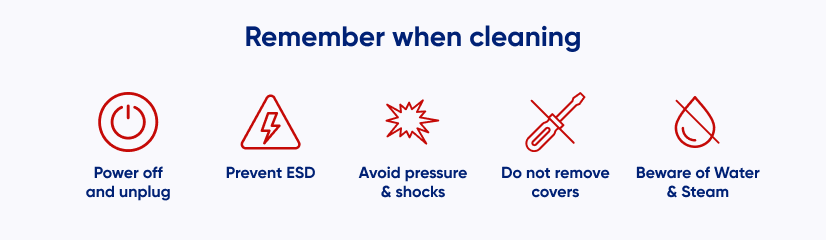
Before starting any cleaning procedure, it’s important to follow these safety steps:
- Disconnect power – always power off the device and unplug all cables.
- Prevent electrostatic discharge (ESD) – ground yourself or wear an anti-static wrist strap.
- Avoid pressure and shocks – TFT, OLED, and LCD displays are mechanically sensitive. Never press on the screen or subject it to impacts.
- Do not remove covers or bezels – removing the housing can damage the display and complicate reassembly.
- Be cautious with water and steam – avoid letting moisture come into contact with PCBs or internal electronics
What products should you use to clean the display?
Only use cleaning tools and liquids that are safe for delicate display surfaces.
- Microfiber cloths – soft, lint-free cloths are ideal for dust and fingerprints.
- Distilled water – slightly dampen a microfiber cloth. Tap water may leave mineral deposits or streaks.
- Isopropyl alcohol (IPA) – only for cleaning PCBs, soldered components, or non-display surfaces. Do not apply directly to the glass.
- Specialized display cleaners – safe for screens when applied to a cloth first; never spray directly onto the surface.
How to clean the display glass
- Power off – ensure the device is turned off and unplugged.
- Remove protective films – take off any screen protectors or protective layers.
- Dust removal – wipe gently with a dry microfiber cloth from top to bottom.
- Stain removal – lightly dampen the cloth with distilled water (squeeze out excess). Wipe evenly in straight lines—avoid circular motions that can leave streaks.
- Drying – wipe with a dry portion of the cloth or allow air drying in a ventilated area.
Tips for cleaning display glass
- Inspect the cloth before use and remove labels or tags that could scratch the surface.
- Avoid paper towels, tissue paper, or abrasive materials.
- Apply minimal pressure—pressing too hard can damage anti-reflective coatings or touch layers.
- Avoid harsh chemical cleaners that contain ammonia or strong solvents.
Safe solvents for cleaning display glass
| Solvent | Use Case |
| Distilled water | Removes dust and fingerprints safely |
| Isopropyl alcohol (IPA) | Cleaning PCBs and soldered components, not glass |
| Diluted white vinegar (1:5 with water) | Removes stubborn stains, use sparingly |
| Specialized display cleaners | Apply to microfiber cloth only, never directly on glass |
Hazardous cleaning agents that can damage an electronic display
Harsh chemicals like ammonia, acetone, ethanol, methylene chloride, can strip coatings, cloud the surface, or damage touch layers.
Even “universal” cleaners may contain solvents that seep under the bezel and cause permanent stains or sensor faults.
Avoid any strong solvents or aggressive detergents—use only mild, neutral products to prevent irreversible damage.
Cleaning a resistive touch screen
Resistive screens, usually made of plastic, are more prone to scratches and wear.
- Use only a soft microfiber cloth.
- Remove dust gently with a dry cloth.
- Lightly dampen with distilled water if necessary.
- Avoid pressing or scrubbing the surface to prevent permanent marks.
Cleaning residue around soldered components
When cleaning electronics near soldered areas:
- use IPA with Q-tips or soft brushes.
- clean gently around components without touching the display glass.
- avoid saturating the area; excess liquid may seep under components and cause short circuits.
- never use metal tools or abrasive materials.
If you are unsure about cleaning methods for specialized modules or need any advice for your device, contact our engineering team for safe and practical recommendations.
DISCOVER OUR
Whitepaper
Achieve the perfect user-display interaction with the right Touch Sensor IC. Ever faced issues with phantom touch events or certification? Boost your R&D like a pro with our Whitepaper!
Go to our product catalog and see how you can save by quality, not on quality.